
Reporting & BI
EE, SETA and BI reports from the data you already keep
HR reporting from one system: statutory reports at the press of a button, dashboards for the board, your own report designs and Excel for everything else.
Why it matters
Reporting season without the spreadsheet rebuild
Statutory reports, done
The EE report and the SETA WSP and ATR come straight from the records HR already keeps.
The 2025 EEA2 form, from your records
Numbers you can defend
Every total traces back to the records behind it, and the workbook can still be adjusted before you submit.
Every number traceable to its records
Answers without a developer
HR builds its own dashboards and reports, with AI assistance, and exports any filtered list to Excel in one click.
Designers included in the system
What it does
From the statutory return to the board pack
The 2025 Employment Equity report
The Department of Employment and Labour changed the EE report in 2025, with sector targets and a new layout. HR Manage generates the new EEA2 as an Excel workbook that looks like the official form, one worksheet per section.
- Workforce profile, movements, terminations and training from the employee, training and disciplinary records
- The EE Movements report lists the appointments, promotions and terminations behind the numbers
EE targets per reporting period
Targets are captured per reporting period and occupational level, by race, gender and foreign nationals. Set them for the whole company or any level of the organisation, and they roll up into company-wide goals.
- Totals, designated-group percentages and the female share calculated as you type
- Last year's targets carry forward
- Targets captured before 2025 pull straight through to the new report
- The actual workforce compared with the targets, with clear indicators where they differ
SETA WSP and ATR
HR Manage generates the Workplace Skills Plan and Annual Training Report from the training records, which already store what the SETAs ask for. Reports are generated in Excel, one section per worksheet.
- OFO codes, skill levels, ABET, scarce skills and formal training
- Filter by branch, department, employee type or training type
- Choose the date range and how completed training is defined
- SETA formats reviewed every year and updated when a SETA changes them
Excel from any list
Filter a list in the Windows application and export it to Excel with one click. Most lists in HR Manage work this way, so data reaches a spreadsheet without a report request.
- Exports the list as you filtered it
- Works on most lists in the Windows application
Plugin reports
Need a listing the standard reports do not give you? People Resolutions delivers custom Excel listing reports as plugins, at very short turnaround, because anyone on our IT team can create one.
- Custom Excel listing reports for your organisation
- Very short turnaround, from the People Resolutions IT team
- Added as a plugin, so you stay on the standard product
Advanced plugin reports
When a report is complex, People Resolutions develops it for you as an advanced plugin report, to your organisation's requirements.
- Complex reports built to your requirements
- Developed by the team that writes HR Manage
- You keep receiving every HR Manage upgrade
BI dashboards
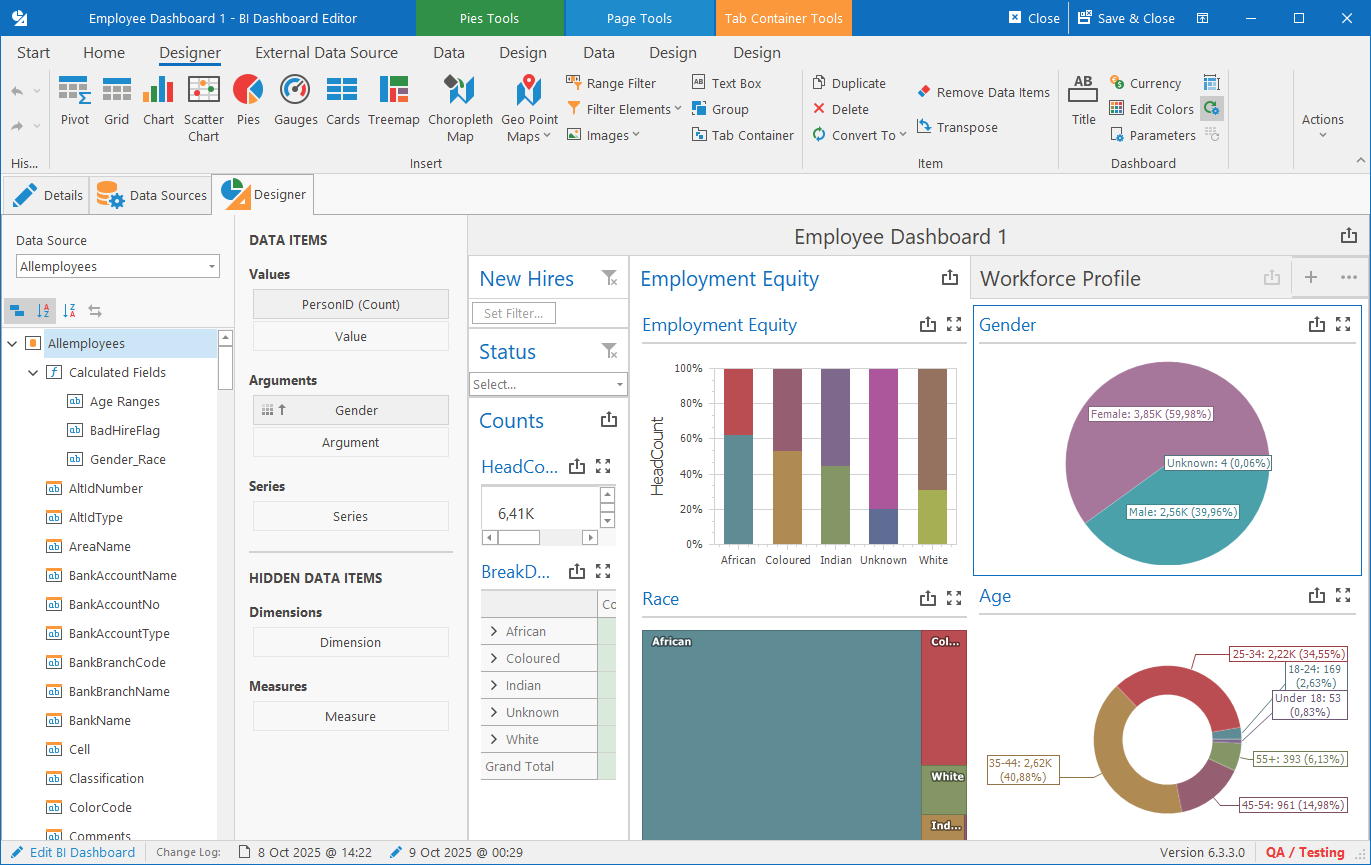
Dashboards, designed in-house
The BI Dashboard designer builds charts, grids, pivots and gauges without custom development, from HR Manage data and from SQL Server, Web APIs, Excel, XML or JSON. Put employment equity, the workforce profile, new hires and terminations side by side on one dashboard.
- Construct dashboards with AI assistance
- Viewed online by people with the correct security clearance
- Each dashboard has its own security group

Report designer
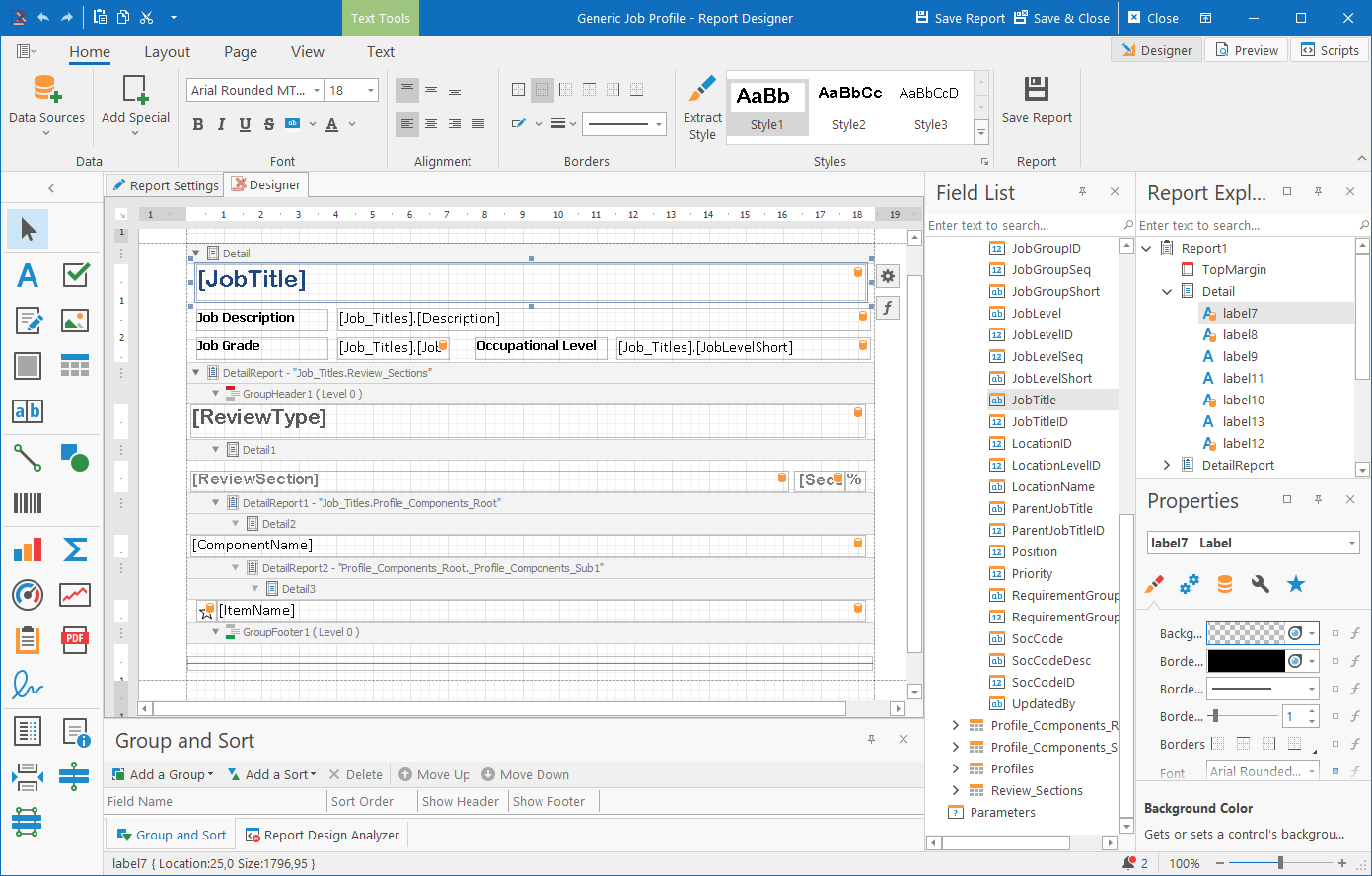
Design your own HR reports
The WYSIWYG report designer creates the reports you need for a specific purpose, based on a record and its related records, and reports can be designed with AI assistance. A designed report appears in the report list of its module, so users find it where they work.
- Certificates, attendance registers, job profiles and forms
- Reports on employees, training events, training records and more
- Print, or save as PDF, Word or Excel
- Program administrators design and publish them without help from People Resolutions
Works with
Part of one HR system
People management
EE reports read employee, occupation and termination records.
Training
The WSP, ATR and EE training section come from training records.
Compliance
Compliance data feeds dashboards and filters.
Self-service
Dashboards open in the web app for the people you allow.
HR Manage is a great system that has brought a simple and convenient way of managing our people within the various HR disciplines and legislative requirements and has a variety of reports that can be pulled at a click of a button.










Does HR Manage produce the 2025 Employment Equity report?
Yes. HR Manage generates the new EEA2, with sector targets, as an Excel workbook that matches the official form.
Where does the EE data come from?
From employee, occupation, termination and formal training records. Nothing is typed into the report by hand.
Can managers see dashboards online?
Yes, if they have the correct security clearance: the dashboard viewer role and access to that dashboard’s security group.
Can we build our own reports without paying for development?
Yes. The report and dashboard designers are part of the system, and we can design a report for you.
Your EE report, your SETA report and your board pack, from the data you already keep.
See your own numbers in a dashboard, with the people who build it.